
23andMe users: Connect your family tree to your DNA test results to get the most out of your 23andMe experience. This works for your online trees at Ancestry, Findmypast, MyHeritage, and more!
If you want to figure out more easily how you’re related to your DNA matches at 23andMe, attach your family tree to your profile.
 You have several options for connecting your online tree to your 23andMe account. You just need to provide URLs for your trees on other websites. The trick is that your matches who may want to see your tree will need to have access to whatever site you send them to.
How to add your family tree to 23andMe
Here’s how to connect a tree to 23andMe. Click on your username > Settings and scroll down to the Enhanced Profile section. Click where it invites you to edit your enhanced profile. On the screen that appears, open the section that says Share a link to your online family tree. You’ll see something like this (but without the reference to managing your FamilySearch tree, since that function is no longer available):
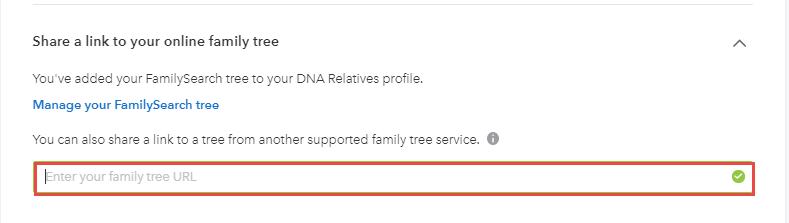
Enter a direct URL to your tree from Ancestry, MyHeritage, Findmypast, Genealogieonline.nl, Geni.com, WikiTree.com or RootsWeb. (Get the direct URL to your trees on Ancestry, Findmypast or MyHeritage by logging in on the site and selecting the appropriate tree. Once you’ve opened the tree, copy the direct link in your browser.)
Learn how to DO the DNA
Adding a family tree to your DNA test results is a good start to using . Get our free guide for more tips on getting started with DNA testing for family history.

